Parameter Viewer
snt view is an optional, read-only graphical browser for DIPL parameters.
It uses the evaluated DIP environment to show values, provenance, and recorded
dependencies. The viewer is part of the main snt executable; it does not
need a separate application binary.
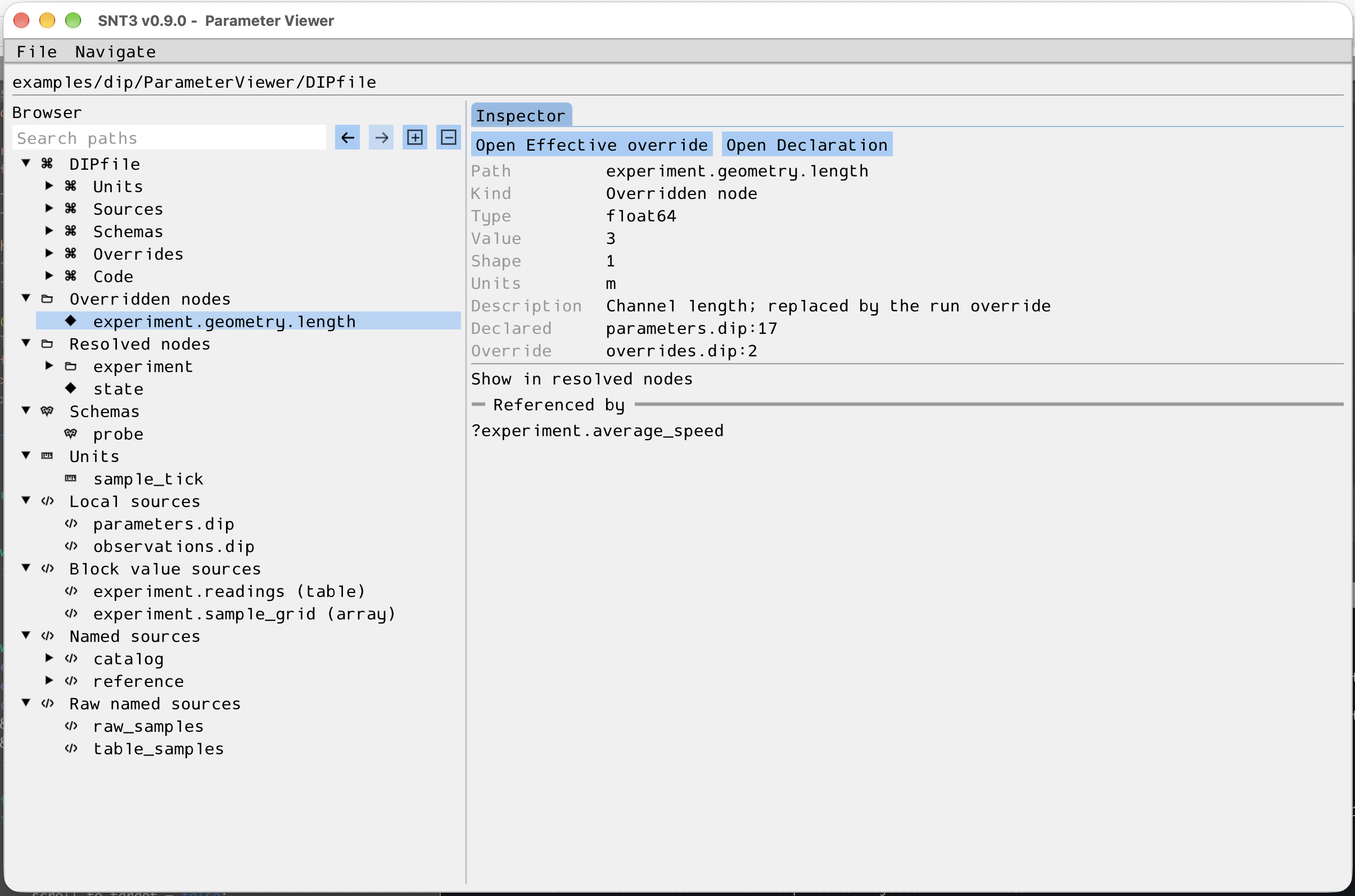
Inspecting an overridden value and its source locations.
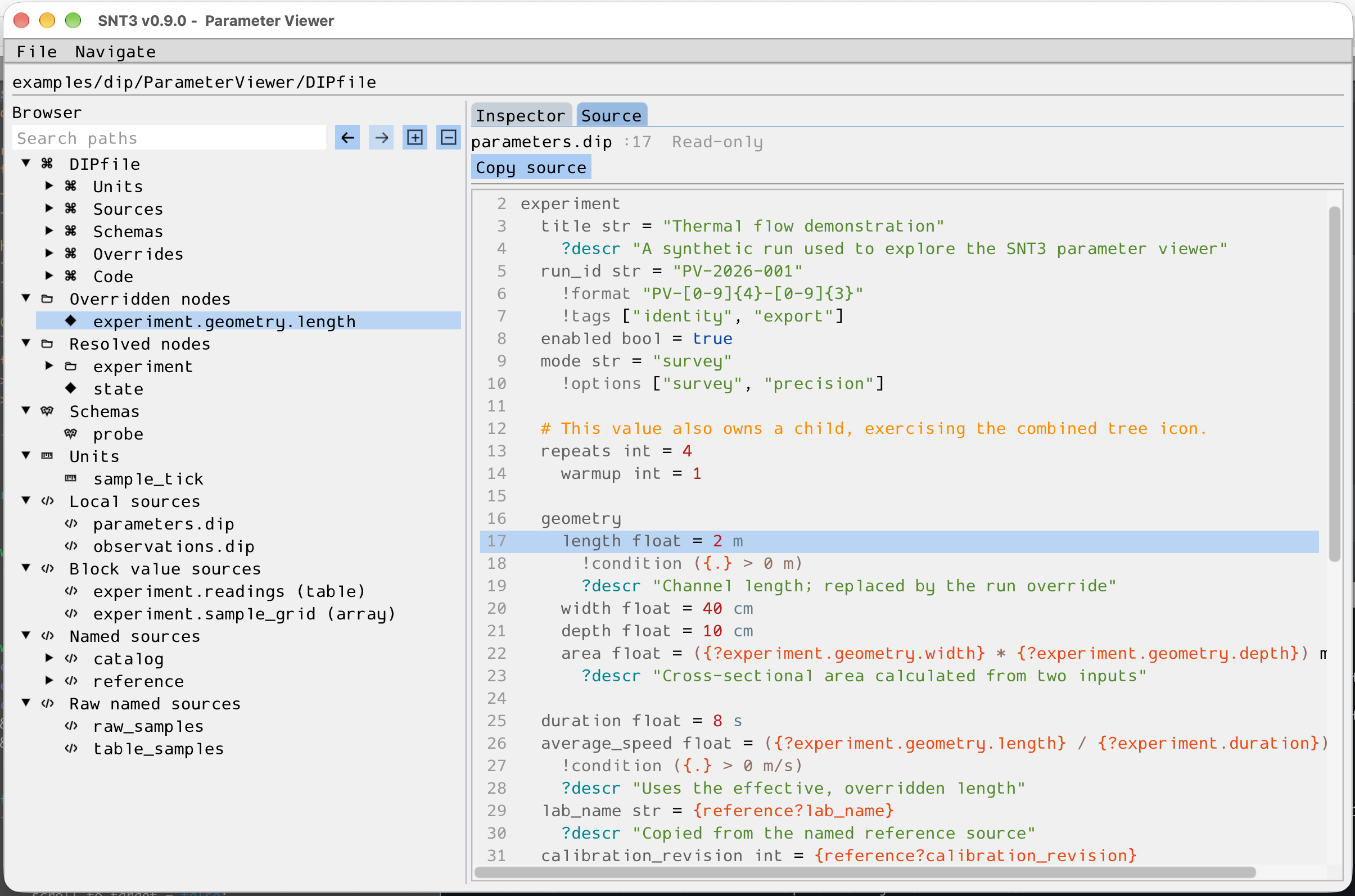
Viewing the read-only DIPL source at the selected declaration.
Select either image to open it at full size.
Build and open
Enable the viewer and initialize its Dear ImGui and GLFW submodules before building:
git submodule update --init external/imgui external/glfw
cmake -S . -B build -DENABLE_SNT_VIEW=ON
cmake --build build --target snt
build/bin/snt view examples/dip/ParameterViewer/DIPfile
The command accepts a live DIPfile, a .dip or .dipl source, or an
evaluated .diph5 snapshot. Viewer support requires
ENABLE_EXEC_APPS_SNT=ON. With ENABLE_SNT_VIEW=OFF, Dear ImGui, GLFW,
and OpenGL are not compiled or linked into snt. See Dependencies
for the general source-build requirements.
On Debian or Ubuntu, these packages provide the native files for the OpenGL, X11, and Wayland backends:
sudo apt-get install libgl-dev libglvnd-dev libx11-dev libxext-dev libxrandr-dev \
  libxinerama-dev libxcursor-dev libxi-dev libwayland-dev libwayland-bin \
  libxkbcommon-dev wayland-protocols pkg-config
If the X11 development library is unavailable, the build skips X11. GLFW
needs wayland-scanner from libwayland-bin when its Wayland backend is
enabled.
Browse a project
The browser separates Overridden nodes, Resolved nodes, schemas, custom
units, Local sources, Block value sources, Named sources, and
Raw named sources. A live DIPfile also has a top
branch, grouping its registered inputs by type with their order preserved
within each group. Use
Search paths to filter the tree,
or the adjacent controls to expand and collapse its branches. Double-click a
tree node to expand or collapse it, or single-click to select it. Select a
parameter to inspect its value, units, metadata, source locations, and
dependencies. Arrays and tables expose a Data tab with bounded pages;
arrays of higher rank allow choosing two displayed axes and fixed indices for
the others. Use the < and > buttons beside a fixed index to step through
that dimension. Data columns initially fit the visible values up to a readable
maximum width. Drag a header divider to resize a column, scroll horizontally
to see more columns, or hover over a clipped cell to read its full value.
Values with recorded dependencies or readers expose a Graph
tab with a local, navigable graph and retained expression composition when
available. Follow a dependency to its input, then use the back and forward
buttons to return to earlier selections. Local sources lists the DIPfile’s
code[] inputs, which define local ?path values. File inputs open their
original DIPL text; inline inputs open at their DIPfile declaration. Their
evaluated parameters appear under Resolved nodes.
Block value sources contains string literals parsed into non-string array
or table values. Array blocks are shown as plain text. Table blocks highlight
DIPL column declarations before --- and show data rows as plain text.
The viewer enables this opt-in retention for live parses.
Evaluated table nodes and their columns link back to the DIPL table declaration
through Open source. For inline table text, Block value sources also
opens the parsed header and rows directly.
Named sources lists parsed DIPL sources[] inputs, whose values are
addressed as source?path. Raw named sources lists unparsed text inputs
registered by sources[]. A value that injects raw source content links
back to its entry when dependency recording is enabled. Raw table files use
the same header and data presentation as table block values.
The top path bar shows the argument supplied to snt view. Source file
locations in the inspector are displayed relative to the opened artifact’s
directory. The ParameterViewer example
provides a project with groups, collections, overrides, schemas, sources,
units, expressions, arrays, and a table for exploring these views.
Open source and reload
For live .dip, .dipl, and DIPfile inputs, Open source opens the
selected declaration in a read-only tab with DIPL syntax highlighting. An
overridden parameter offers its effective override and original declaration.
Custom units and schemas link to their definitions. The source tab also has a
Copy source button. For code embedded as a string in a DIPfile, the
action points to the string’s registration line;
its internal line numbers do not refer to physical file lines.
Use File → Reload or Ctrl+R after editing an input file externally. If the updated input fails to parse, the viewer keeps the last valid state and displays the error. Selecting a different browser object closes the previous object’s Source tab and refreshes the contextual tabs.
Snapshot limits
A .diph5 snapshot stores evaluated values and selected provenance, but
does not retain complete source text or the live DIPfile manifest. Source
opening and browsing named source nodes are therefore available only for live
inputs. Standalone .dipt opening and scalable access to large numerical
datasets are not yet available.
For the C++ inspection functions behind these views, see DIP inspection.